A typical wedding involves a dozen or more vendors, and most of them want a deposit up front and the balance later. The venue might take a deposit to hold the date and the rest in installments. The photographer wants a retainer. The florist wants half now and half two weeks before the wedding. Keeping track of who you've paid, how much, and what's still due is one of the most stressful parts of wedding planning, and it's where costly mistakes happen.
Here's a simple system for tracking wedding vendor deposits and payments, and how VowPair's free budget tracker does it for you.
Start with the price you actually agreed
The first number that matters isn't the starting price on a vendor's website. It's the price in your contract, after packages, add-ons, travel fees and taxes. Write that number down as soon as you sign. Everything else (what you've paid, what's left) is calculated from it.
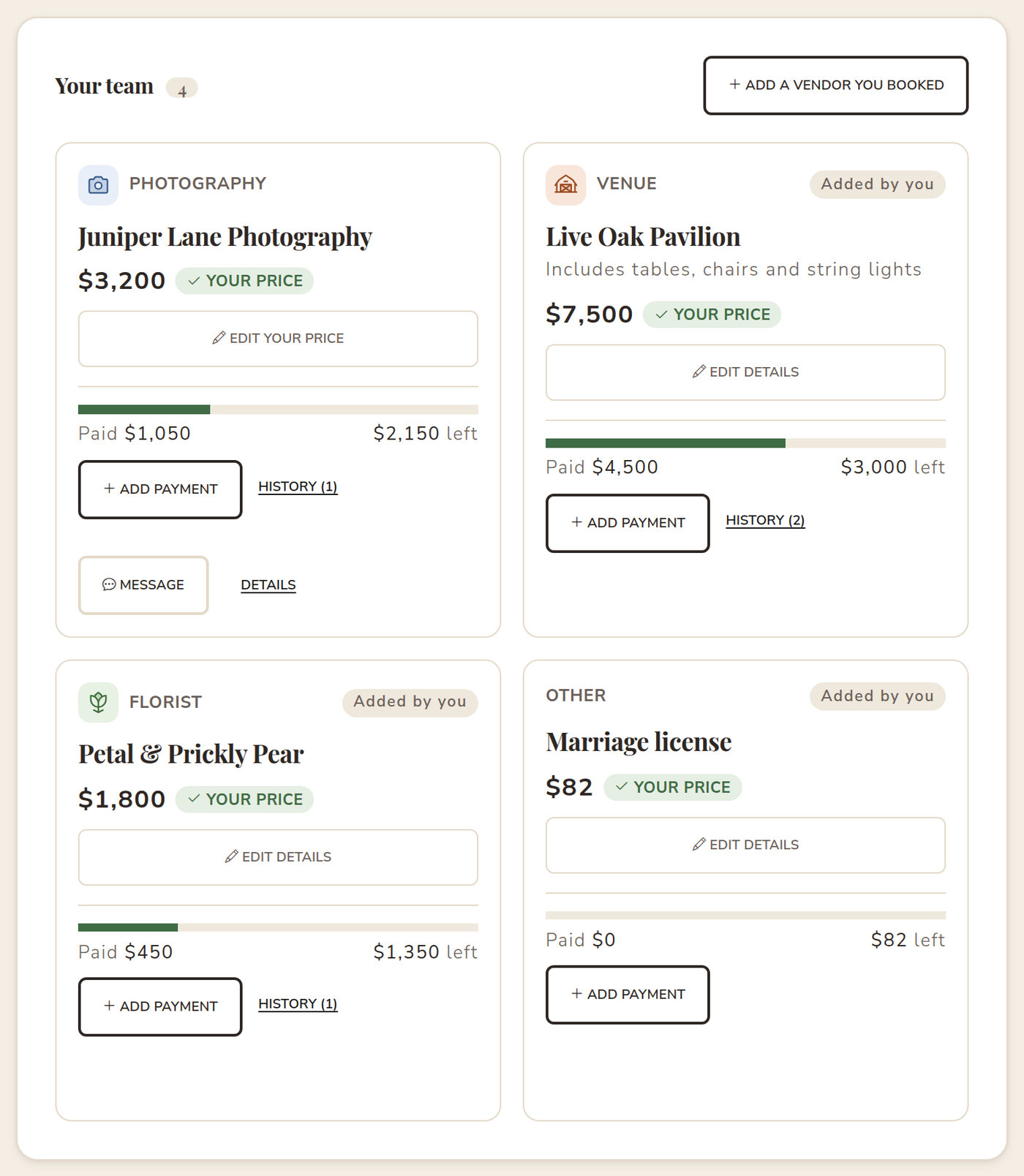
In VowPair, every booked vendor card shows the price clearly labelled. If it's still the vendor's listed price, it says Estimate and gives you a Confirm your price button. Enter the number from your contract and the label changes to Your price. Your projected wedding budget updates immediately.
Record every deposit and payment as you make it
The habit that saves the most stress is simple: record each payment the day you make it. For each one, note:
- Who you paid.
- How much, and whether it was a deposit or a payment toward the balance.
- When you paid it.
- How, with a short note like "check #1042" or "paid by card", so you can match it to your bank statement later.
On VowPair, every vendor card has an Add payment button. Choose Deposit or Payment, enter the amount and the date, and save. The card's progress bar fills in and shows exactly how much is left. Once a vendor is paid off, the card says Paid in full.
Keep one list of every payment
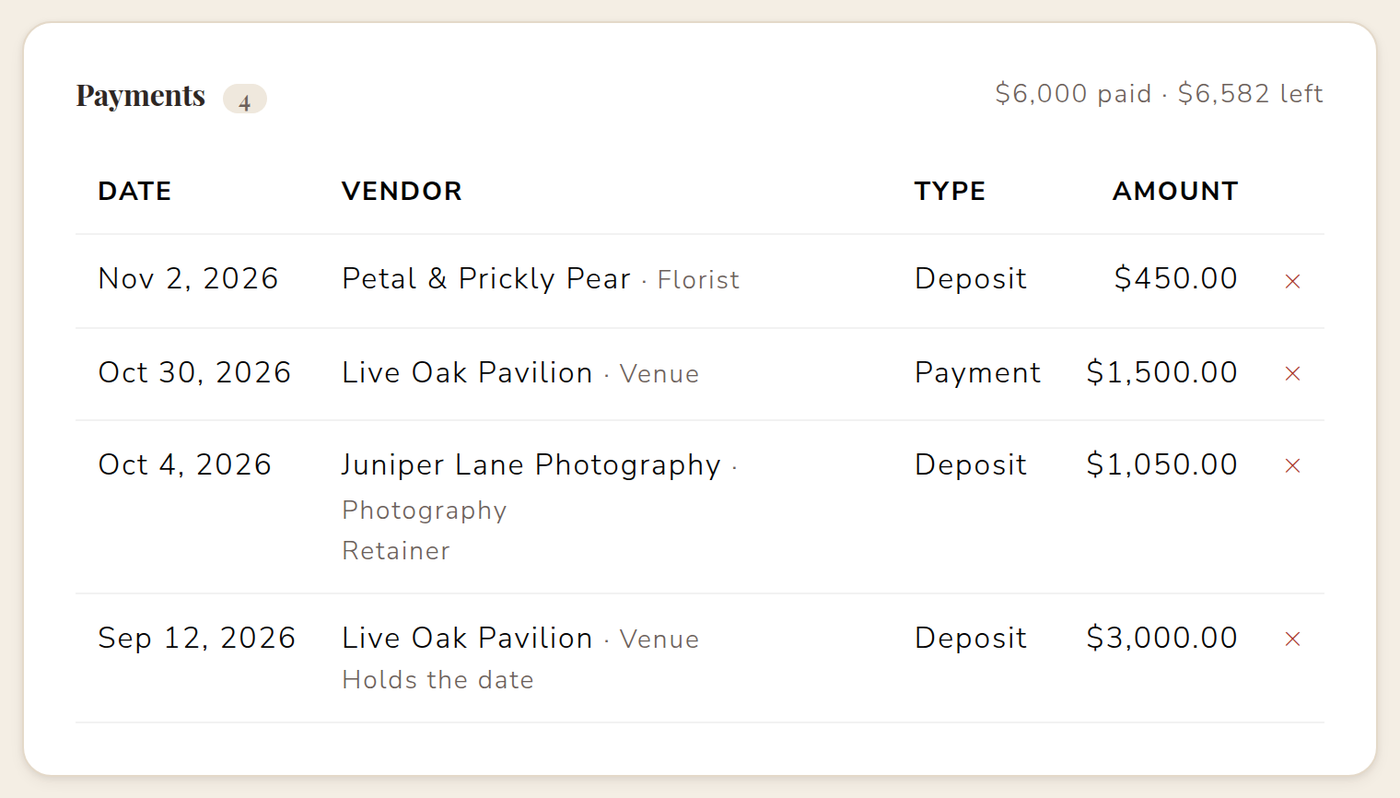
Per-vendor totals are great day to day. Before a big payment is due, though, it helps to see everything at once. VowPair's Payments list shows every deposit and payment you've recorded, newest first, with the vendor, type, amount and any note.
Include vendors you booked anywhere
Your budget tracker is only useful if it includes everything. That means the venue you toured before you found VowPair, the cake from a family friend, and small costs like the marriage license or alterations. Use Add a vendor you booked to add any vendor or expense with a price. If you still had an open request for that category, VowPair can close it for you, so you stop getting matches for something you've already booked.
Know your real "left to pay" number
At the top of your dashboard, VowPair shows two numbers side by side: Paid so far and Left to pay your team. That second number is the one to plan around. It tells you how much cash you need before the wedding for the vendors you've already booked, separate from the categories you're still shopping for.
Share the work, not just the stress
If your partner or a parent is paying some of the vendors, invite them to your plan so they can record their payments too. Everyone sees the same totals, and nobody has to forward screenshots of receipts. Learn how in planning your wedding together.
A few practical tips
- Check each contract for the final payment due date, and put it on your calendar.
- Ask vendors whether deposits are refundable, and note it on the vendor.
- Keep receipts. VowPair is your record, but vendors and your bank are the source of truth.
- Review your totals monthly. Small add-ons add up quickly.
VowPair doesn't process payments between you and your vendors; you pay them directly. The budget tracker is free and private to you and anyone you invite. Start tracking your wedding budget for free.
Cover photo by Kelly Sikkema on Unsplash. Screenshots use sample data; names are fictional.