Planning a wedding means keeping a lot of numbers straight: what you hoped to spend, what each vendor actually quoted, which deposits are paid, and what's still due before the big day. Most couples end up juggling a spreadsheet, a notes app and a long group text. We built VowPair's new planning tools so all of that lives in one place, right next to the vendors you're matching with.
Here's what's new for couples planning a wedding in San Antonio, New Braunfels and the rest of Central Texas. Everything below is free for couples.
1. A wedding budget tracker that uses your real prices
VowPair has always shown an estimate for each vendor you book, based on the packages and prices vendors list. Now you can replace that estimate with the price you actually agreed. Every booked vendor shows a small label so you always know which numbers are real: Estimate or Your price. Confirming a price takes one tap, and your projected total updates instantly.
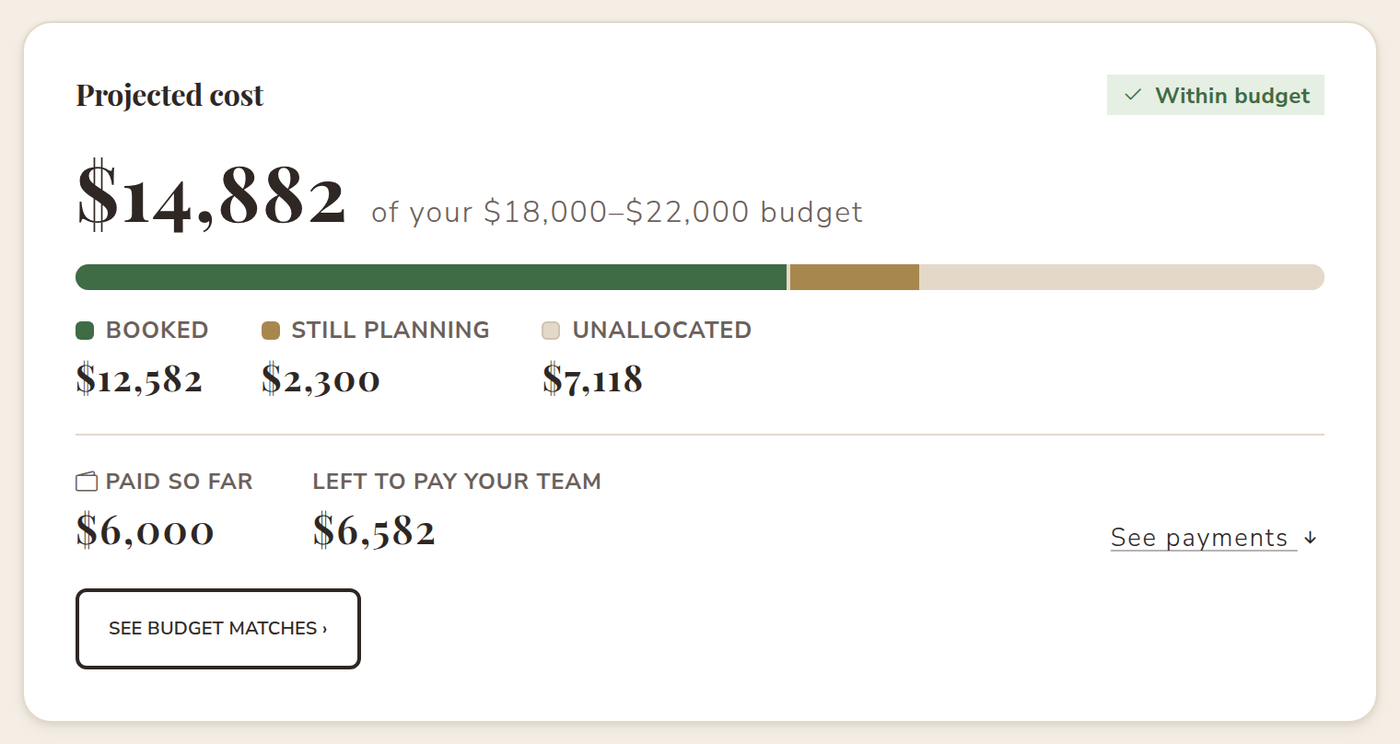
Booked a vendor somewhere else? Add them anyway. Your venue, the florist your aunt recommended, even the marriage license: add any vendor or expense with a price, and it counts toward your wedding budget just like a vendor you found on VowPair.
2. Deposits and payments, tracked per vendor
Every vendor card now shows how much you've paid and how much is left. Record a deposit or a payment right on the card, with the date and an optional note like "check #1042". VowPair keeps a full payment history, so when a final balance comes due you're not digging through bank statements to remember what you already sent.
VowPair doesn't process payments between you and your vendors. It's your own record, private to you and the people you invite to help plan. We wrote a full guide on how to track wedding vendor deposits and payments.
3. Plan together with your partner, family and friends
Most weddings have more than one planner. Now you can invite your partner, your mom, a sibling or your best friend into your VowPair plan. Choose whether each person can help plan (browse matches, select vendors, update prices and record payments) or just follow along with view-only access.
A few things stay yours: messages with vendors, your wedding website and public share links. Vendors always know they're talking to you, not to whoever happened to be logged in. Read more in planning your wedding together.
4. Your wedding website, RSVPs and registry
If you haven't tried it yet: describe your wedding in your own words and VowPair drafts a complete wedding website for you, with your story, the schedule, travel details and FAQs. Guests RSVP for their whole party, choose meals and share dietary needs, and you can download the guest list anytime. See the free wedding website guide for a closer look.
How it all fits together
The budget tracker is what makes VowPair different from a generic wedding planning app. It sits right beside budget-first matching: you set what you want to spend on each service, VowPair shows you vendors whose prices actually fit, and once you book, the real price and every payment flow straight into your totals. You can see at a glance whether you're on track, before anything becomes a surprise.
- Set your budget for each service you still need.
- Pick vendors who fit, with a plain-English reason for every match.
- Track every dollar: confirmed prices, deposits, payments and what's still due.
- Plan together with the people helping you.
Ready to try it? Start planning with VowPair for free. It takes a few minutes to set up, and your contact information stays private until you choose to share it.
Cover photo by Julio Lopez on Unsplash. Screenshots use sample data; names are fictional.