Hardly anyone plans a wedding alone. Your partner has opinions about the band. Your mom has a florist in mind. Your best friend is the one who actually reads the vendor contracts. But the planning itself usually lives in one person's inbox and spreadsheet, and everyone else gets screenshots in a group chat.
VowPair's planning team fixes that. You can invite the people helping you into your wedding plan, so everyone works from the same budget, the same vendor shortlist and the same payment records.
Who to invite
Think about who is actually involved in decisions or payments:
- Your partner, so you're both looking at the same plan.
- Parents or family who are contributing to the budget or paying specific vendors.
- A sibling or best friend who's helping you research and compare vendors.
- A maid of honor or best man who wants to follow along.
Choose what each person can do
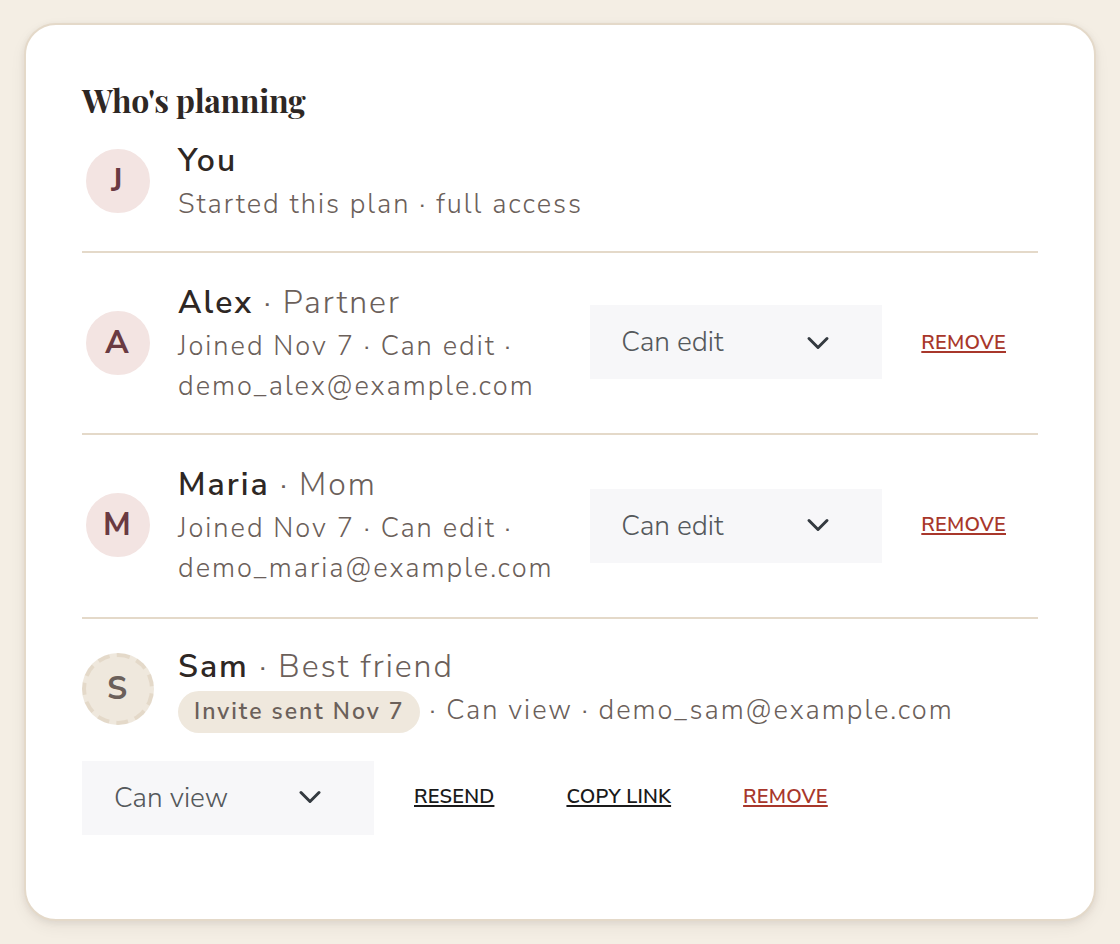
When you invite someone, you choose one of two levels of access, and you can change it anytime:
- Help plan: they can browse your matches, shortlist and select vendors, close or reopen categories, confirm prices, add vendors you booked elsewhere, and record deposits and payments.
- View only: they can see your plan and wedding budget, but can't change anything. It's great for family who want to stay in the loop.
What stays yours
Some things should only come from the couple. On VowPair, these always stay with you:
- Messages with vendors. Vendors know they're talking to you, not to whoever is logged in.
- Your wedding website and invitation.
- Public share links for your requests.
- The planning team itself. Only you can invite or remove people.
Your helpers also can't see your private conversations with vendors. They see the plan: budgets, matches, who's booked and what's been paid.
How inviting works
- Open Planning team from your dashboard or the account menu.
- Enter their name and email, an optional relationship like "Mom" or "Partner", and choose Help plan or View only.
- They get an email with a private link that works once. They can create a free VowPair account in a minute, or sign in if they already have one.
- Once they join, they land right on your wedding plan, and you get a notification.
Changed your mind? You can switch someone to view only, resend an invite, copy the invite link, or remove them at any time. Removing someone takes away their access immediately.
Already planning your own wedding?
If you're helping a friend while planning your own wedding, you can do both. VowPair adds a simple "Working on" switcher to your account menu, so you can move between your wedding and theirs without logging out.
Why it helps
Shared planning works best when everyone sees the same numbers. When your mom records the deposit she paid the florist, your budget tracker updates for everyone. When your partner shortlists a photographer, it shows up on your shortlist too. There are fewer "did anyone pay the DJ?" texts, and more time spent on the fun parts. Read about the budget tracker your team can update together.
Planning together is free on VowPair, like everything for couples. Start your plan and invite your people.
Cover photo by Fotógrafo Samuel Cruz on Unsplash. Screenshots use sample data; names are fictional.